Compass Cave Survey Software Logo - Bats, Compass and Night Sky
Custom Search

COMPASS For Windows
Compass Tour
New Features: 99-11
Cartography Tools
Live 3D Cave Images
On-line Help (New)
Written Description
History: 99-11
Testimonial Letters
Contact Author
Getting COMPASS
Getting Compass
Compass On A CD.
ESRI/ArcView Tools.
3D Glasses
Cave Data
Registration Information
Credit Card Reg.
Reg. Info/Forms
Printable Forms
Tutorials - (New)
Google Earth Overlay
Cartography Tools
Sketch Editor.
SVG Export
Inkscape SVG Maps
Illustrator SVG Maps
SVG Round Tripping
Adopting SVG Maps
Complex Plot Tutorials
Trouble Shoot CaveX
Exporting HPGL
Canvas Digital Map 
ArcView/ESRI
Italian Tutorial
DEM Tutorial
Links
Cave Related Links
User's Pages
User's Group
User Questions
Documents/White Papers
Compass File Formats
ArcView/ESRI
Finding Blunders
Finding Loops
Loop Closure
Least Squares
Survey Blunders
J. Halleck- On Loops
History/Philosophy
About The Author
COMPASS For DOS
DOS Compass Demos
DOS Compass Features
Magazine Review
MISC.
Other Products


<< Last

Top

Next >>

Cleanup.

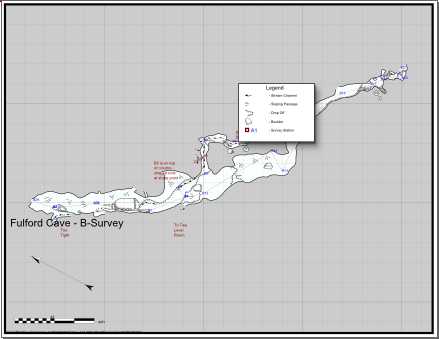
G. Cleanup. After you have saved your new file, you should open it in your drawing program. The map to the right show the result of my radical changes to the B-Survey map.

Even a perfectly adjusted map will have things that need to be cleaned up. For example, in this map, the legend box needs to be moved because the cave has moved under it. Like wise, the cave has rotated so one of the red  label overlaps. These are minor problems that are easy to adjust in your drawing program

<< Last

Top

Next >>

<< Home

Custom Search