Compass Cave Survey Software Logo - Bats, Compass and Night Sky
Custom Search
 
 Sponsored Links


COMPASS For Windows
• Compass Tour
• Other New Features
• Cartography Tools
• Live 3D Cave Images
• On-line Help (New)
• Written Description
• Revision History: 99-21
• Testimonial Letters
• Contact Author
Getting COMPASS
• Getting Compass
•Compass On A CD.
• Previous Versions  (New)
Download/Install Issues
• Installation Instructions
• Antivirus Issues
• Authenticating Files
• False Positives
Registration Information
• Credit Card Reg.
• Reg. Info/Forms
• Printable Reg. Form
• 3rd Party Reg. Form
Auxiliary Tools/Information
• Cave Data
• 3D Glasses
• ESRI/ArcView Tools
Tutorials - (New)
• Inkscape Tips and Tricks
• Radio Locations
• Magnetic Anomalies
• Installing Under Win8
• Compass on Mac/Linux
• Google Earth Overlay
• Declination/Convergence
• Cartography Tools
• Sketch Editor.
• SVG Export
• Inkscape SVG Maps
• Illustrator SVG Maps
• SVG Round Tripping
• Adopting SVG Maps
• Complex Plot Tutorials
• Trouble Shoot CaveX
• Exporting HPGL
• Canvas Digital Map 
• ArcView/ESRI
• Italian Tutorial
• Using the Compass CD
• DEM Tutorial
Links
• Cave Related Links
• User's Pages
• User's Group
• User Questions
Documents/White Papers
• Compass File Formats
• ArcView/ESRI
• Finding Blunders
• Finding Loops
• Loop Closure
• Least Squares Papers
• Least Squares Issues
• Passage Modeling
• Survey Blunders
• J. Halleck- On Loops
• History/Philosophy
• SEF File Format (1992)
• About The Author
COMPASS For DOS
• DOS Compass Demos
• DOS Compass Features
• Magazine Review
MISC.
• Betas
• Other Products


Color By Depth

Depth based coloring allows you to color passages based on the depth below the top of the cave.
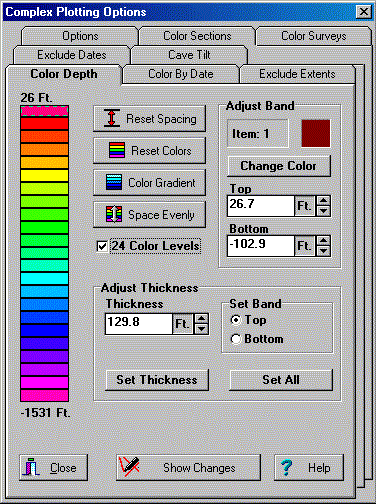
This dialog box is used to set the depth coloring of the image. The color bar on the left gives visual represation of the color depth. The bar between each band of color can be dragged into position with the mouse. This enables you build non-linear and non-equally-spaced color schemes. Colors can be copied between bands by dragging-and-dropping. You can also numerical set the top and bottom of each band. Finally, you can set each color band and build smooth color gradients between any two colors.

Strategraphic Profile In Lechuguilla Cave
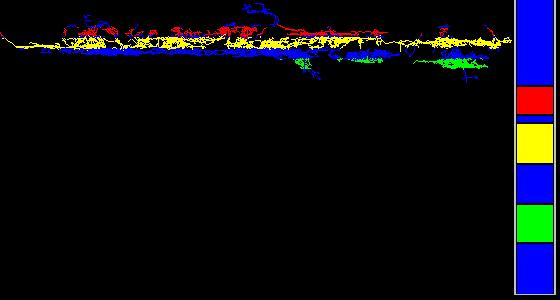
This image shows a profile view of Lechuguilla Cave where I have colored three different zones of cave development red, yellow and blue. I have transplanted the color bar into the image so you can see the type of color bar that was used to create this image. This image illustrates the ability to generate non-equally spaced color scheme.

Rainbow Coloring of the Bottom Hundred Feet of Lechuguilla Cave
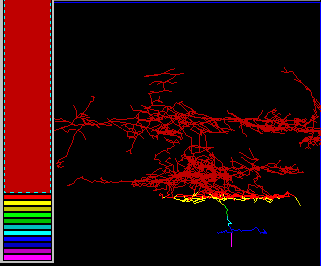
This image also illustrates a non-linear depth color scheme. Here I have colored the bottom few hundred feet of Lechuguilla with a rainbow color scheme. The color bar to the left illustrates how the image was created. It is so easy to setup these complex color scheme that it took me less than 15 seconds for me drag and push the colors into position. This image allows you to see the details of a particular segment of cave depth.

 
 Sponsored Links
Sponsored Links
 Sponsored Links
 Sponsored Links

<< Home

Custom Search