Compass Cave Survey Software Logo - Bats, Compass and Night Sky
Custom Search
 
 Sponsored Links


COMPASS For Windows
Compass Tour
Other New Features
Cartography Tools
Live 3D Cave Images
On-line Help (New)
Written Description
Revision History: 99-21
Testimonial Letters
Contact Author
Getting COMPASS
Getting Compass
Compass On A CD.
Download/Install Issues
Installation Instructions
Antivirus Issues
Authenticating Files
False Positives
Registration Information
Credit Card Reg.
Reg. Info/Forms
Printable Reg. Form
3rd Party Reg. Form
Auxiliary Tools/Information
Cave Data
3D Glasses
ESRI/ArcView Tools
Tutorials - (New)
Inkscape Tips and Tricks
Radio Locations
Magnetic Anomalies
Installing Under Win8
Compass on Mac/Linux
Google Earth Overlay
Declination/Convergence
Cartography Tools
Sketch Editor.
SVG Export
Inkscape SVG Maps
Illustrator SVG Maps
SVG Round Tripping
Adopting SVG Maps
Complex Plot Tutorials
Trouble Shoot CaveX
Exporting HPGL
Canvas Digital Map 
ArcView/ESRI
Italian Tutorial
Using the Compass CD
DEM Tutorial
Links
Cave Related Links
User's Pages
User's Group
User Questions
Documents/White Papers
Compass File Formats
ArcView/ESRI
Finding Blunders
Finding Loops
Loop Closure
Least Squares Papers
Least Squares Issues
Passage Modeling
Survey Blunders
J. Halleck- On Loops
History/Philosophy
SEF File Format (1992)
About The Author
COMPASS For DOS
DOS Compass Demos
DOS Compass Features
Magazine Review
MISC.
Betas
Other Products


THE GTFVIEWER.
The GTFViewer is a utility program that allows you to view, manipulate and load "GeoTiff" images into Compass. GeoTiff files are produced by the USGS and other government agencies and they generally contain topo maps and aerial photographs. The program has many features: 

LARGE IMAGES. GeoTiff files can be very large and Windows 95/98/Me has trouble handling large bitmap images. This leads to memory errors even when the computer has plenty of memory. The GTFViewer uses special routines to minimize the effects of these problems. Under Win NT, 2000 and XP, the GTFViewer can deal with  images of any size with absolutely no problems.

TRIMMING IMAGES. The GTFViewer allows you to trim off parts of the image to get rid of borders and to zero in on specific parts of a map or aerial photograph. This also reduces the size of the file, which can make it more useful for publication or display on the web.

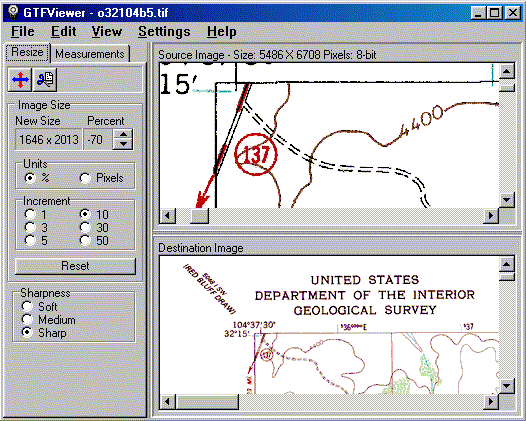
RESIZING. GeoTiff files are often very large, which makes them difficult to handle or view on normal computer screen. The GTFViewer can rescale an image to any size. The program uses special resizing algorithms, which minimize artifacts and loss of resolution.

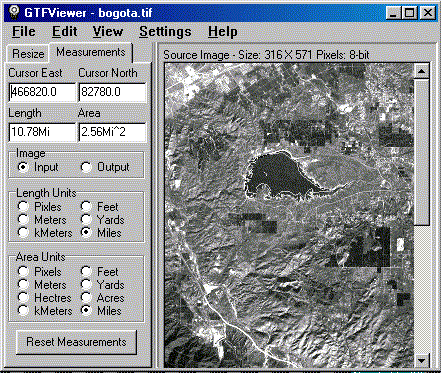
MEASURING. Many GeoTiff files contain scale and location information. As a result, the GTFViewer can measure distances and surface area on maps and aerial photographs. Distances can be measured along curving features such as roads, streams, etc. Area can be measured for irregular shapes such as lakes, cities, etc. Example. In the example to the above, we are measuring the perimeter and area of reservoir near Bogota, Columbia. As you can see, the perimeter is 10.7 miles and the area is 2.5 square miles.

PRINTING. The GTFViewer has special features help you deal with printing large images. The images can be shrunk to fit the size of the paper. It also capable of printing full resolution images tiled across multiple sheets of paper.  

 
 Sponsored Links
Sponsored Links
 Sponsored Links
 Sponsored Links

<< Home

Custom Search